Rel. 3.0.3107.1 / 4.0.3107.1
Release date: September 2, 2026
Important to know about DPG Outlook Office Addin
System requirements
To use the new DPG Outlook Office Addin, the following system requirements must be met:
- Exchange Online.
- For Windows, New Outlook requires JavaScript API 1.15.
- For Mac, New Outlook currently only requires JavaScript API 1.14.
- Newer versions of common browsers. DPG Outlook Office Addin has been tested on Edge, Chrome, Safari, Firefox. Note that in Private/Incognito mode, the functionality of New Outlook cannot be guaranteed, and therefore neither can DPG Outlook Office Addin.
In general, you should also strive to be fully updated on the latest OS updates as well as the latest updates/versions of Office/Outlook.
See also this page at Microsoft for more information about JavaScript.
Versions
Note that DPG Outlook Office Addin is released in two versions: version 3 and version 4. This is due to a change in the way the Send button works in New Outlook:
- In version 3 of DPG Outlook Office Addin, secure mail is sent when the user selects Send in a new email. This means that Outlook will always try to send secure mail through DPG. This is suitable for users who often need to send secure mail, and is also closer to the user experience in DPG COM Addin (Classic Outlook).
- In version 4 of DPG Outlook Office Addin, secure mail is only attempted to be sent when the user selects the new Send button from within the DPG AddIn itself. This is suitable for users who send secure mail occasionally.
Otherwise, the user experience is very similar between the two versions.
Only one user per AddIn version
Users of the individual releases of DPG Outlook Office Addin are assigned in Azure. Several releases can be found in Azure: Version 3 and 4, both in a test and release deployment version. It is very important that a user only exists in one of the available releases.
Test and release deployment versions
Please note that we strongly recommend installing new versions of a DPG Outlook Office Addin release in two stages: First to a selected group of power users who can test and verify that the new release works in the current environment, and then to everyone in the organization. This is described in Installing DPG Outlook Office Addin.
Safari and Firefox do not display the Office Add-in
If you use Safari or Firefox, you may see a message like this:

This may be because Outlook has not yet loaded the Add-in. More commonly, however, it is caused by a validation function in Microsoft's API for Office Add-ins that tests whether pop-up windows are blocked in the browser. If this happens, allow outlook.office.com and outlook.cloud.microsoft in the browser's pop-up blocking settings.
See Issues with Safari and Firefox for information on how to change this setting.
Validations
The underlying validation mechanisms have been optimized so that DPG Outlook Office Addin does not remain in a state where "DPG Secure Communication - Initializing!" is displayed.
Digital Post and mit.dk
Only show organization when relevant
For Digital Post and mit.dk, the Recipient input field now only displays the help text "...or organization name" if a CVR connection has been created.
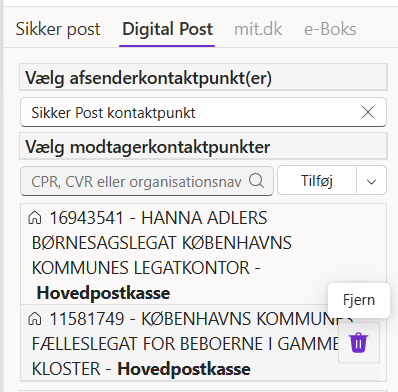
Remove recipients
You can now remove recipients or contact points that you do not want to send to by selecting Remove ():
Digital Post, mit.dk, and e-Boks
When a recipient has been entered and approved, the cursor remains in the recipient input field, ready for the next recipient. This provides a faster and more efficient workflow.
Clearing the recipient cache
A function has been added to clear the local client's recipient cache using a button that is permanently displayed at the bottom of the user interface.

Mail Guard help text
The Mail Guard help text (tooltip) has been moved and now disappears immediately when a recipient is no longer in focus:
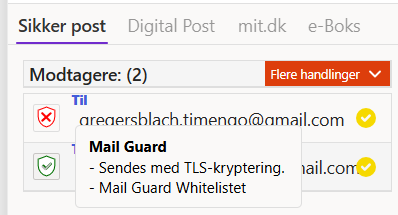
This makes it easier to see the fields you are working in.