DPG COM Addin (Classic Outlook) release 7.78.0
Release date: September 2, 2026
In the following, we describe the changes that have been made to all versions of DPG Outlook COM Addin for Windows that are still supported. Release notes are displayed with a version number, date of release, a brief heading, as well as a more detailed description of the new or altered functionality.
Editing the recipient list
Recipients can now be removed directly from the recipient list in DPG COM Addin. A new Remove field next to each recipient lets you remove recipients from the list.
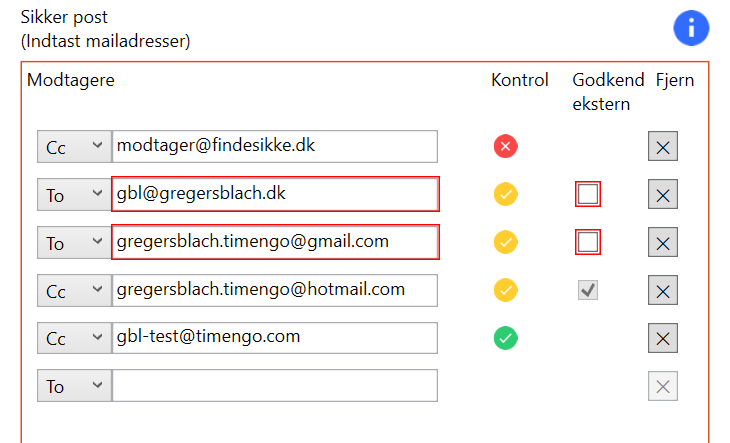
You can now add recipients, select the recipient type (To, CC, or BCC), approve external recipients, and remove recipients directly from the recipient list in the AddIn.
Microsoft sensitivity labels
When an email is encrypted and protected with a Microsoft sensitivity label, recipients cannot be changed in the DPG AddIn. The user is now informed of this and shown how recipients can be removed:
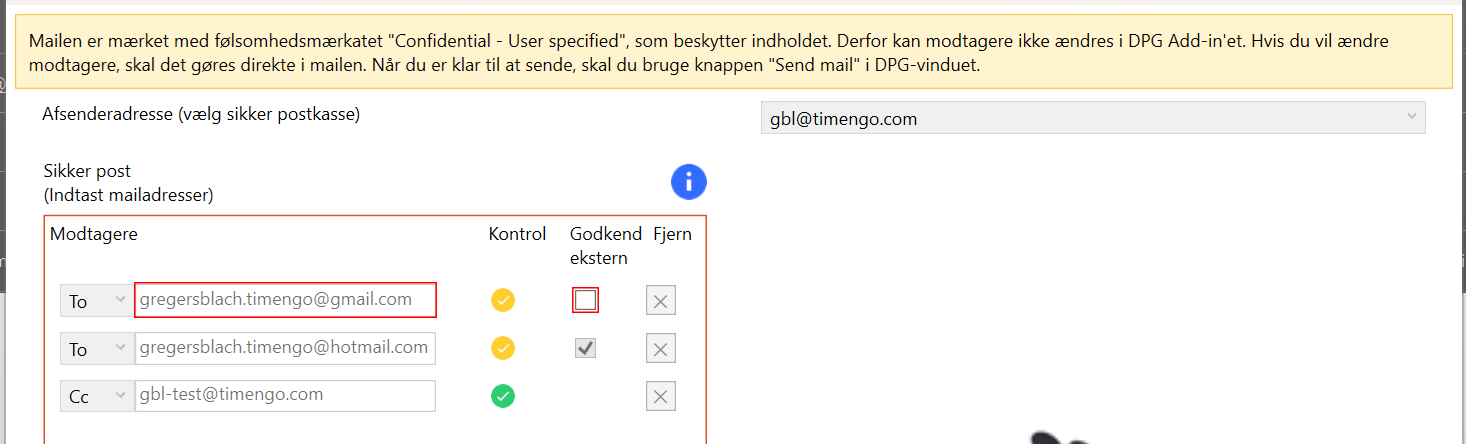
The recipient list can be changed directly in the email, and the email must be sent using the Send email button in the DPG window.
To enable support for sensitivity labels, create a new Windows Registry key named SensitivityLabelContentBitsEncryptionIsApplied. For more information, see Technical details.